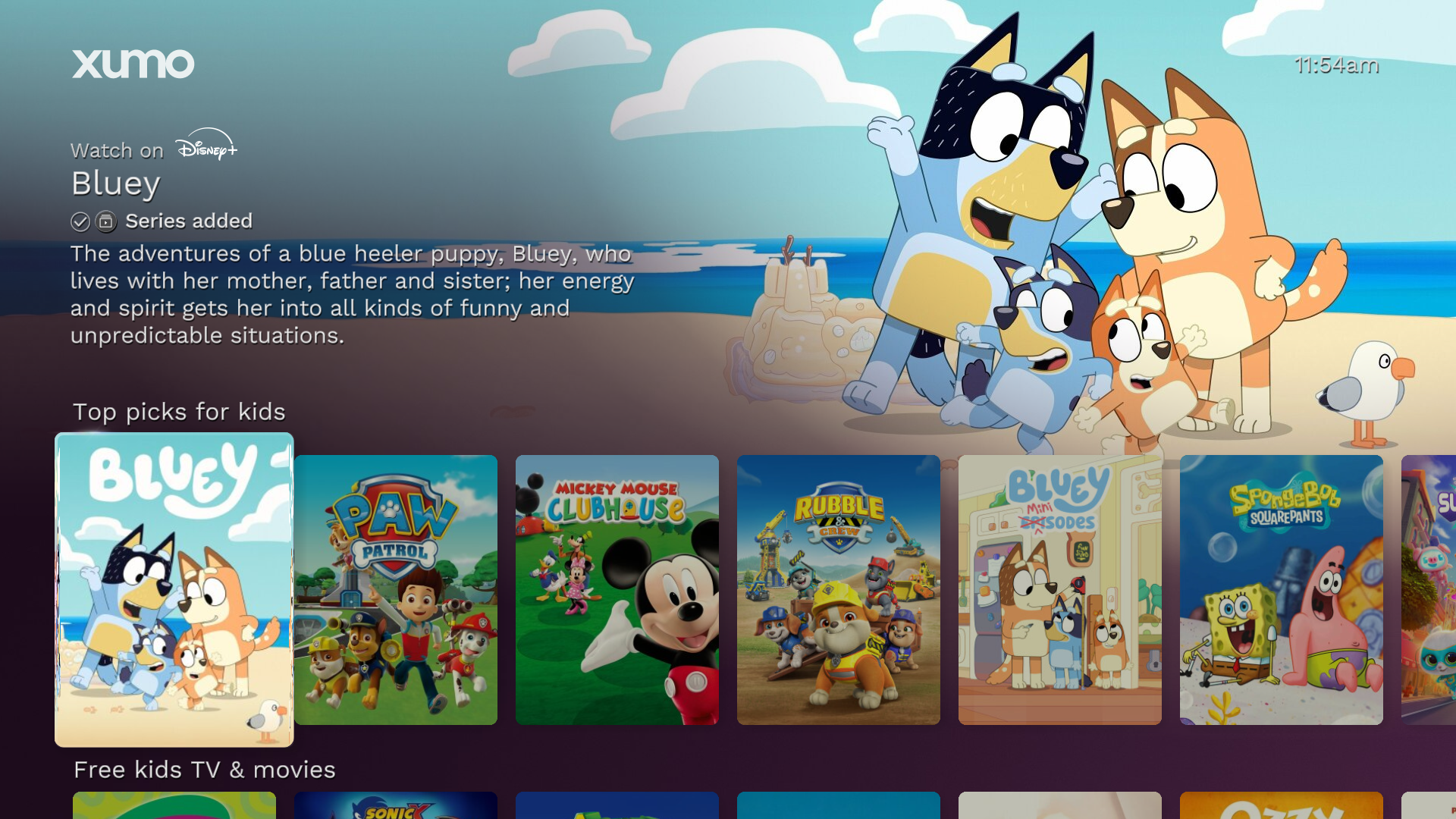
Child-directed page and rail for Bluey
To meet our obligations of providing a safe and appropriate service for minors (i.e., children and teens), the platform uses a combination of profiles and tags to identify apps, content, and parts of the user interface (UI) that are likely to be considered child-directed, intended for children, or intended for teens. This may include apps, content, and parts of the UI curated for those younger audiences.
Child-directed tags are appended to anything that targets children or appeals to children. This can include things like a children’s curated section, a movie geared toward young viewers, or a collection of children’s cartoons. Consequently, child-directed tags will be appended to any launch events that originate from a child profile.
Teen-directed tags are appended to any content curated in a teen profile, or any launch events that originate from a teen profile.
Since we expect that minors will access apps and content directed towards them, each instance of the following must comply with applicable laws related to child-directed services, children’s privacy, and teen privacy:
Content directed to children
Data obtained from children or teens
Any event data that is provided by the platform that includes a child-directed tag, child profile tag, or teen profile tag.
For United States distribution only
These guidelines are currently specific to apps distributed within the United States; non-US propositions may be subject to different requirements.
These guidelines may be updated in the future based on changes to the platform (including information it has from or about users) and changes to US law. Notably, teen privacy requirements are increasingly governed by state-specific frameworks that may be updated according to individual state laws. You should consult legal counsel regarding your obligations. Refer below to the Methods of child and teen tagging the platform uses to make such determinations.
Our approach
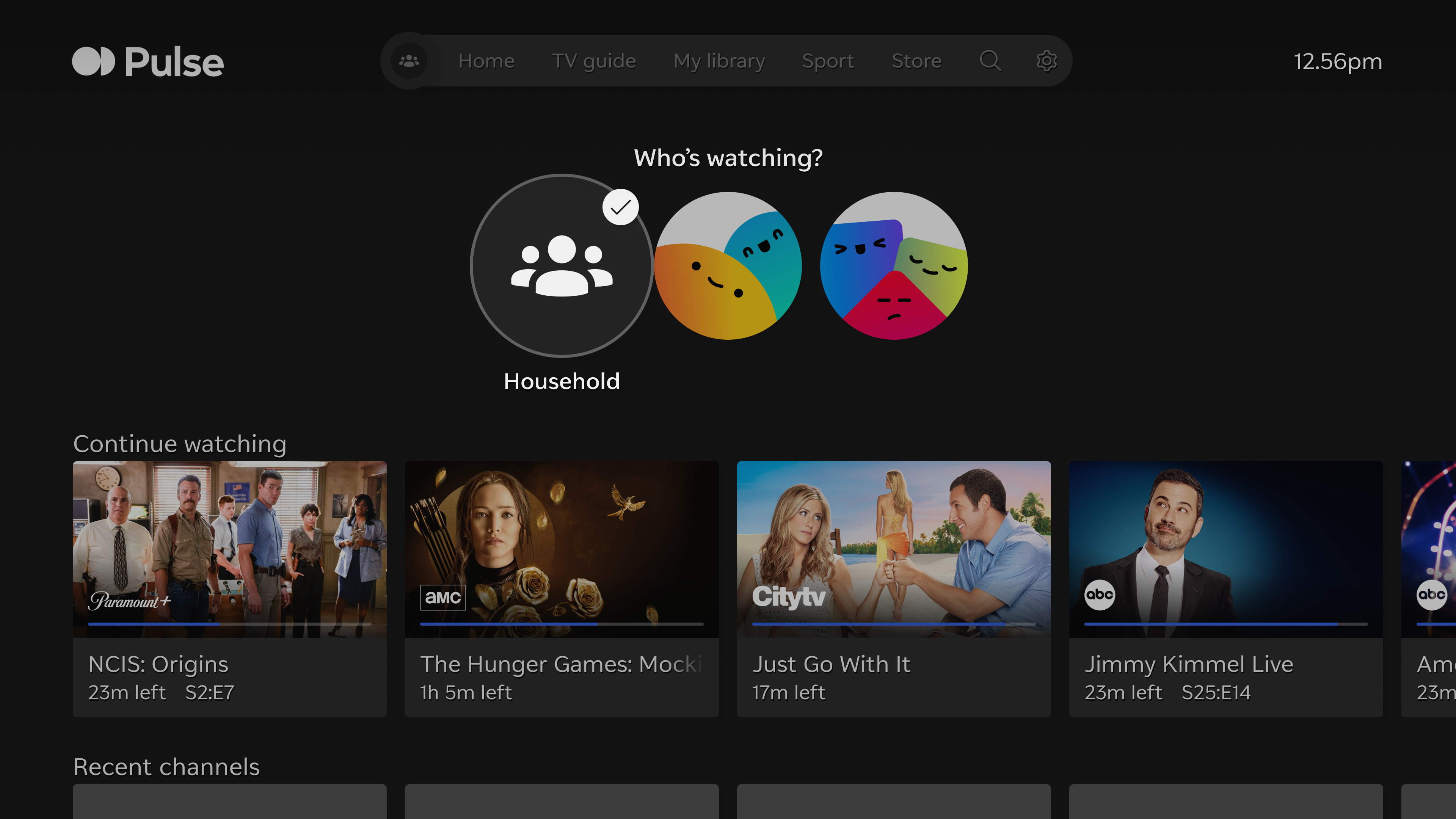
Example profile switcher screen
Profiles
Entertainment OS devices utilize 3 types of profiles to manage specific aspects of the experience.
Household profile: An experience for the household that has full access to all standard content and functionality on the device. This experience includes personalized recommendations, targeted advertisements, merchandised content, and Continue Watching content based on account viewing.
Child profile: A “walled garden” experience that contains only age-appropriate content for children aged 12 and under.
Teen profile: A “walled garden” experience that contains only age-appropriate content for teens aged 13 to 17.
Aside from providing only age-appropriate content, all child and teen profiles currently contain the following safeguards:
There are no personalized recommendations or targeted advertisements.
Autoplay is always disabled to help manage screen time.
A PIN is required to make purchases or exit the child or teen profile.
There are additional controls that parents can set to restrict specific age ratings.
This approach may be updated in the future consistent with applicable law, and any material changes will be communicated in advance.
Not all devices and services utilize child and teen profiles
Only devices that run on Entertainment OS offer child and teens profiles. Devices that do not support these profiles instead utilize household parental control settings that enable similar child-safe functionality.
Tagging
Our platform is unique from other content aggregators in that it surfaces and curates specific content, not just apps. We use tags on apps, content, and parts of the UI that are child-directed (or that children are likely to access). Child-directed tagging ensures that areas of the UI intended for children only contain child-directed content. Once an app is launched, the app is responsible for the content it makes accessible to users.
The platform uses 7 types of tagging for these purposes:
App tagging is used for applications that are directed to children.
Page, rail, and feed tagging is used for parts of the household UI that are directed to children (e.g., a rail of child-directed movies, a page of “kids and family” content).
Content tagging is used for specific content that is directed to children (e.g., a particular game for children, a cartoon that kids watch, content that an app knows is being viewed in a child profile).
Continue Watching tagging is used for watch history data related to the Continue Watching platform feature.
App metrics tagging is used for app metrics data that supports targeted advertising and audience segmentation.
Ad call tagging is used for shared ad inventory data.
Profile tagging is used for all engagement with content when the user is within a child profile or teen profile experience.
You can view additional details on how tagging is provided and received in the Methods of child and teen tagging section below.
Content experience
Household profile experience
Child-directed tagging is one way that the platform curates content for different audiences. The first example below shows child-directed content on child-directed pages. Only child-directed elements (e.g., content, apps, and parts of the UI) will appear on the rails on these child-directed pages.
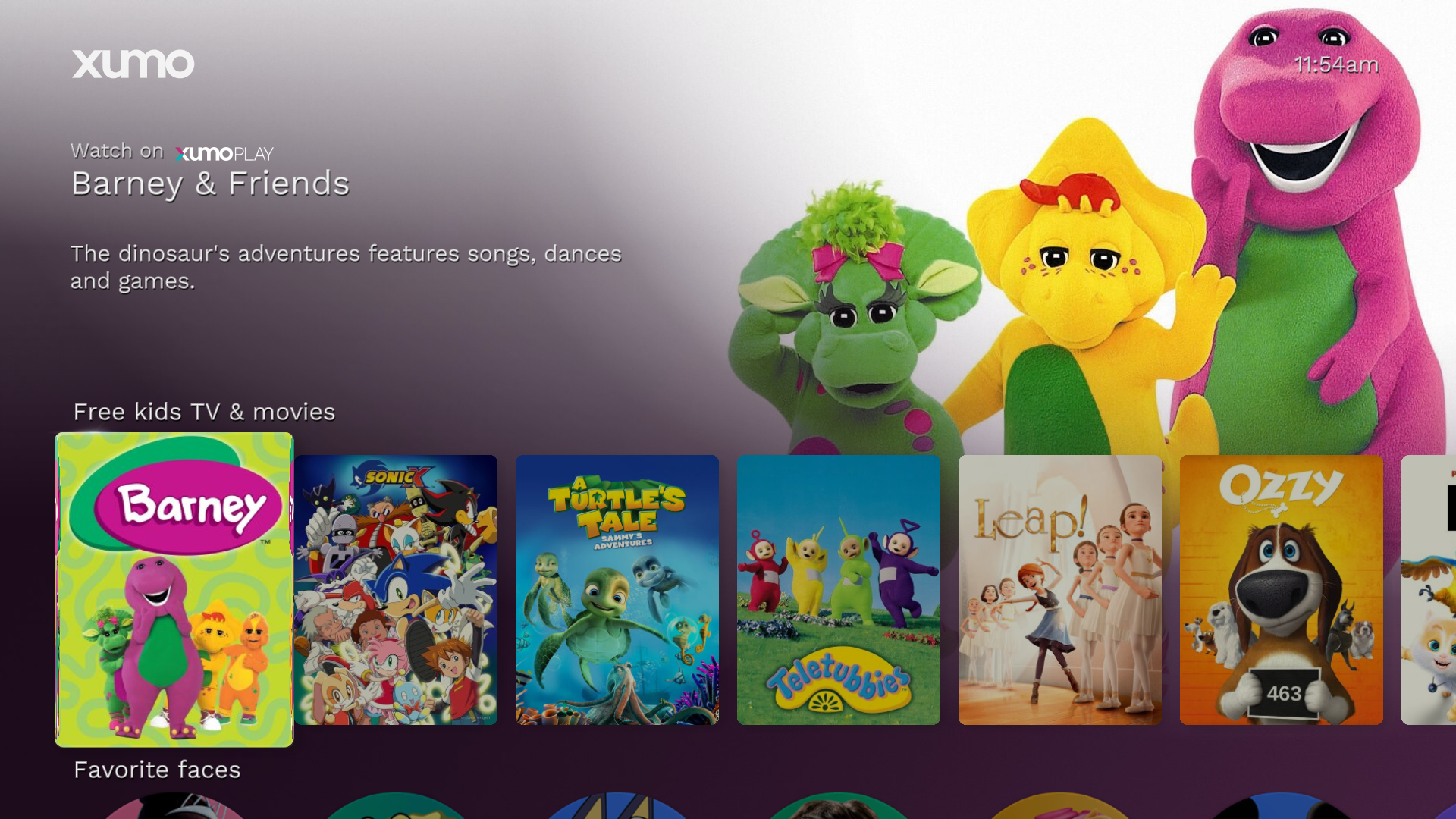
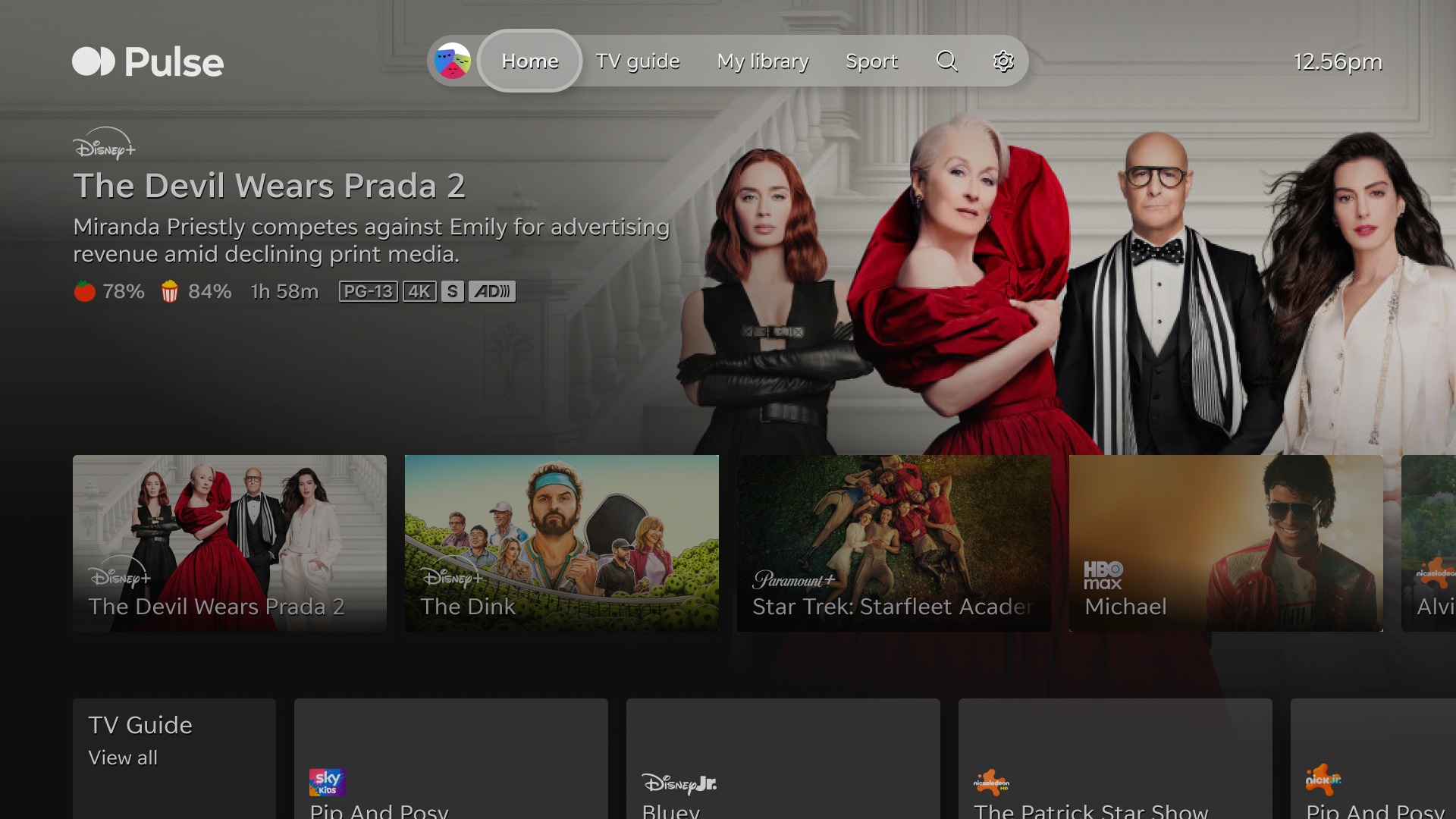
Child-directed page and rail for Barney
Alternatively, some pages may have a mix of child-directed and non-child directed content on the rails. Other pages might not have any child-directed content at all.
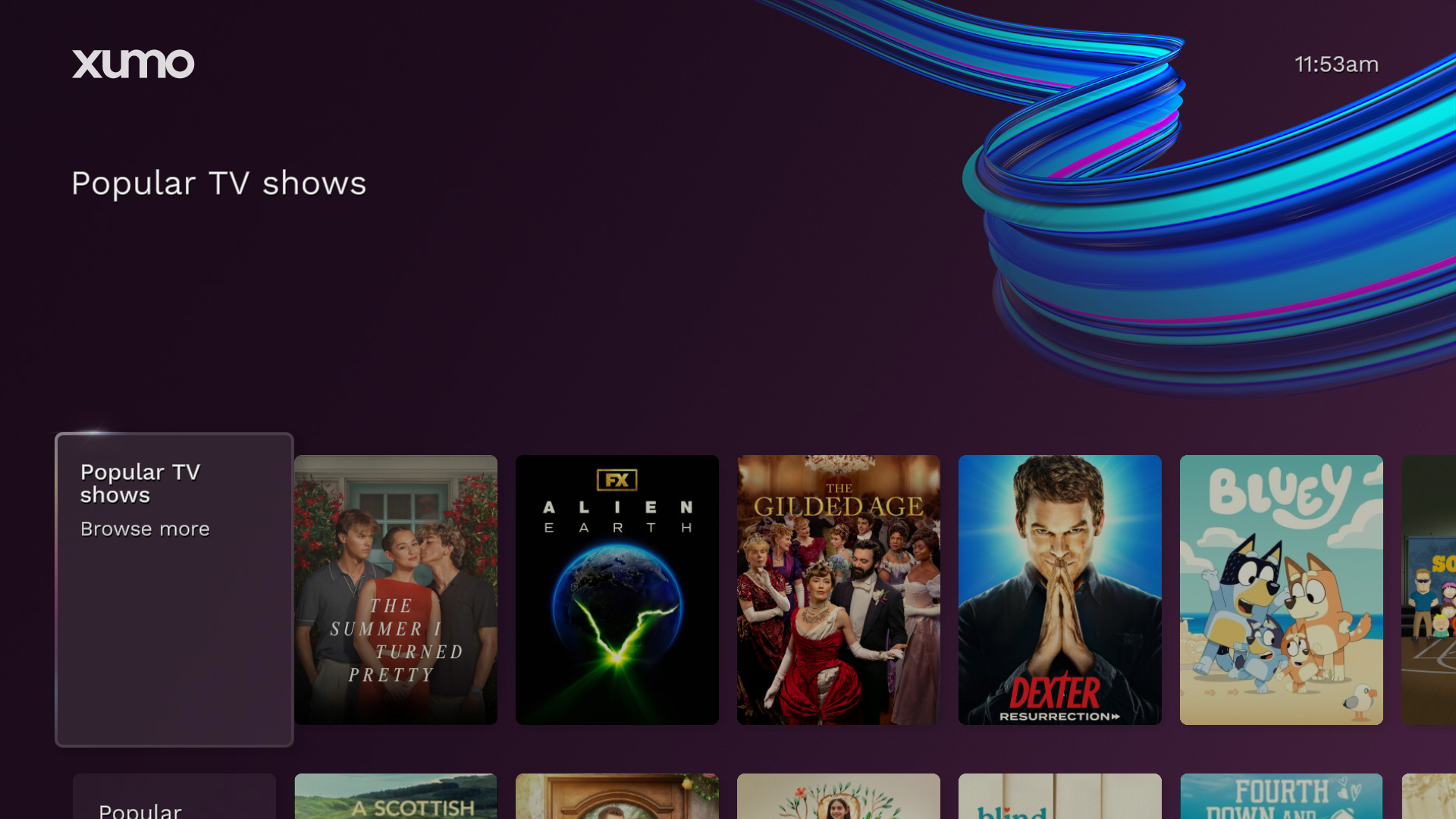
Mixed content page and rail
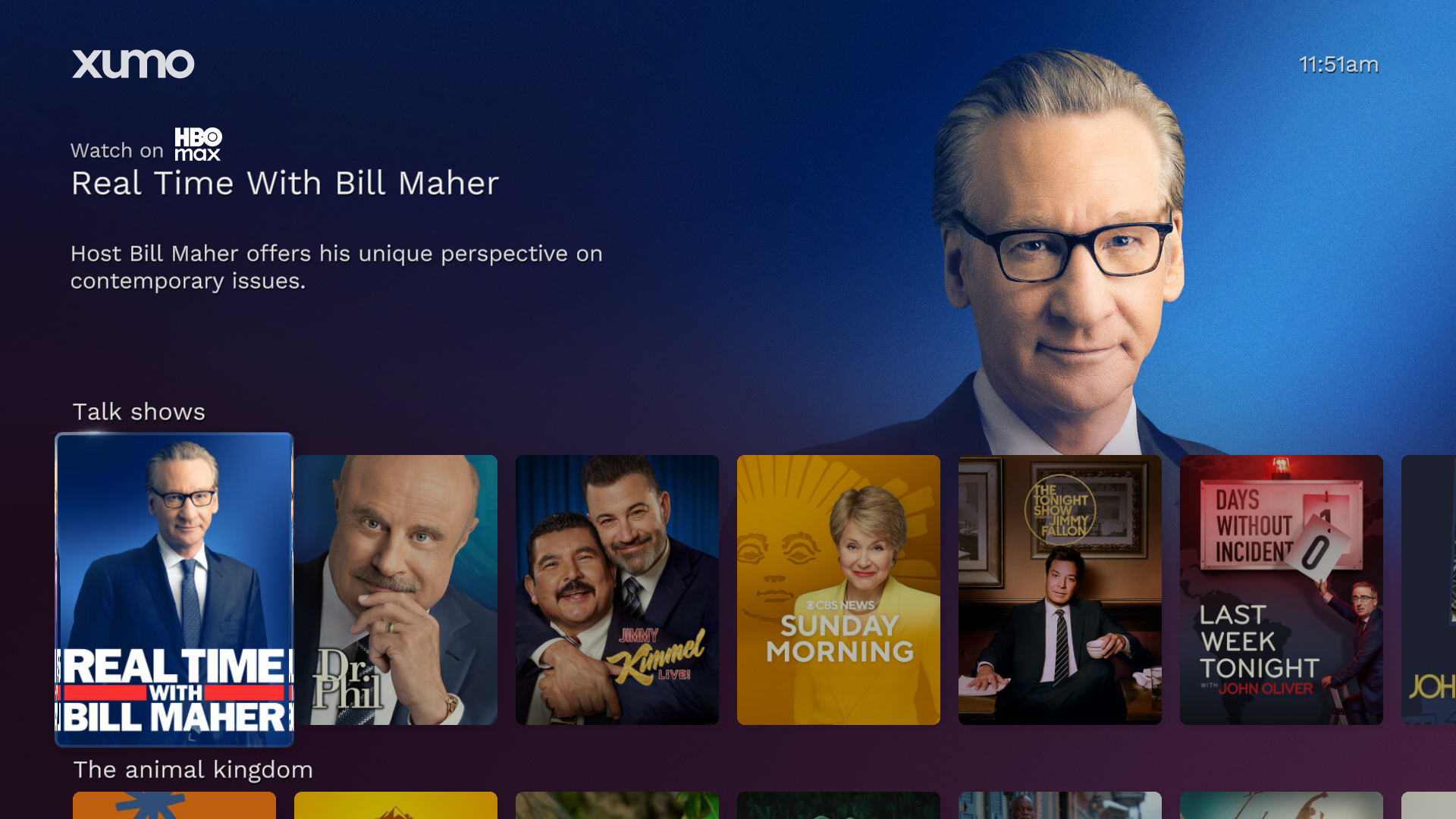
Non-child-directed page and rail
Child and teen profile experiences
.png)
Example child profile
Example teen profile
Methods of child and teen tagging
Apps, content, and parts of the UI all require different methods for applying child-directed and profile tags. Each method of tagging is provided by one party, received by the other party, and is shared/maintained according to the specific cadence detailed in the table below.
Method | Provided by | Received by | Cadence |
|---|---|---|---|
App tagging | Partner (You) | Platform | One-off, annual certification |
Page, rail, feed tagging | Platform | Partner (You) | Ongoing |
Content tagging | Platform* | Partner (You) | Ongoing |
Continue watching tagging | Partner (You) | Platform | Ongoing |
App metrics tagging | Partner (You) | Platform | Ongoing |
Ad call tagging | Partner (You) | Platform | Ongoing |
Child and teen profile tagging | Platform | Partner (You) | Ongoing |
*based in part on metadata from Partner
Future plans for child and teen tagging
There are future changes planned for child and teen tagging on the platform. Notably, there are plans to accept watch history data with child/teen tags and use that data to deliver Continue Watching tiles in child/teen profiles, respectively.
When available, the platform will communicate details and timelines for any:
New features that require additional updates to your app.
Changes to these guidelines to ensure they remain consistent with applicable laws.
App tagging
Our platform relies on all partners telling us if their app is wholly or primarily directed to children. Apps that self-designate as child-directed will be tagged and placed appropriately within our platform based on that designation.
If you designate your app as child-directed, the platform will tag all content from your app as child-directed content. Your app and its content will be accessible from child-directed areas of the platform, but they can also still appear in non-child-directed areas.
Even if you do not designate your app as child-directed, it may still contain child-directed content. In this case, those individual pieces of content will be tagged as child-directed using our Content tagging algorithm. However, your app itself will be considered non-child-directed.
Determining whether your app is child-directed
If you’re unsure whether your app qualifies as child-directed, ask your legal team, refer to your local and national laws, and check guidance from regulators, such as guidance from the Federal Trade Commission (FTC).
Child-directed app status categories
All app content partners must self-designate each app as one of the following categories. This designation will be used to determine the level of Content tagging that will be applied to the app. App categories will be reviewed on a periodic basis and all Apps must notify Comcast of any changes that affect their designation.
Category | Description |
|---|---|
Intended for children | If you’ve identified your app as intended for children, the platform will tag all content from your app as child-directed content. Your app and its content will be accessible from child-directed areas of the platform, but they can also still appear in non-child-directed areas. Apps intended for children must include appropriate tags (including child-directed tags) with any app data you send |
Intend for general audiences, with child sections or child-directed content | If you’ve identified your app as intended for general audiences with some child-directed content, the platform will tag individual pieces of content as child-directed (using the Content Tagging logic), but your app itself will be considered non-child-directed. If your app has sections or profiles accessible to children, you must include appropriate tags (including child-directed tags) with any app data you send. |
Intended for general audiences, without child sections or child-directed content | If you’ve identified your app as intended for general audiences with no child-directed content, your app and its content will not be accessible in child-directed areas of the platform. Comcast may periodically review your app content for child-directed content. |
Intended for adults, without child sections or child-directed content | If you’ve identified your app as intended for adults, with no child-directed content, your app and its content will not be accessible in child-directed areas of the platform. Comcast may periodically review your app content for child-directed content. |
Page, rail, and feed tagging
Our platform editorial team will manually identify and tag any pages, rails, or feeds that are child-directed. We make editorial decisions (with respect to what is appropriate for children of different ages) based on our Content tagging logic and related subject matter curation factors.
Content tagging
To identify child-directed and teen-appropriate content, we use a standard algorithm based on a combination of age ratings and genre tags.
Content tagging data sources
The child-directed and teen-appropriate tagging algorithm uses several data sources. For content age ratings, we use the following sources:
Motion Picture Association of America (MPAA) is an association that rates films based on their appropriateness for different audiences. Learn more about MPAA ratings.
V-chip is a television set technology that allows people in the US, Canada, Mexico, and Brazil to block TV programs based on their ratings. Learn more about V-chip.
Gracenote Children’s / Family Entertainment Genre tag is used to identify likely child-directed content. Gracenote is an entertainment data provider that applies this genre tag to programming that has a target audience of children up through mid-teens and that can be enjoyed without parental supervision. For example, Blue’s Clues and Hannah Montana would both receive a Children’s / Family Entertainment Genre tag.
Kid’s iTheme is internally generated by Comcast based on Gracenote genre tags, and content tags provided to Comcast by Video on Demand (VOD) providers and Over-the-Top (OTT) content providers.
Child-directed tagging logic
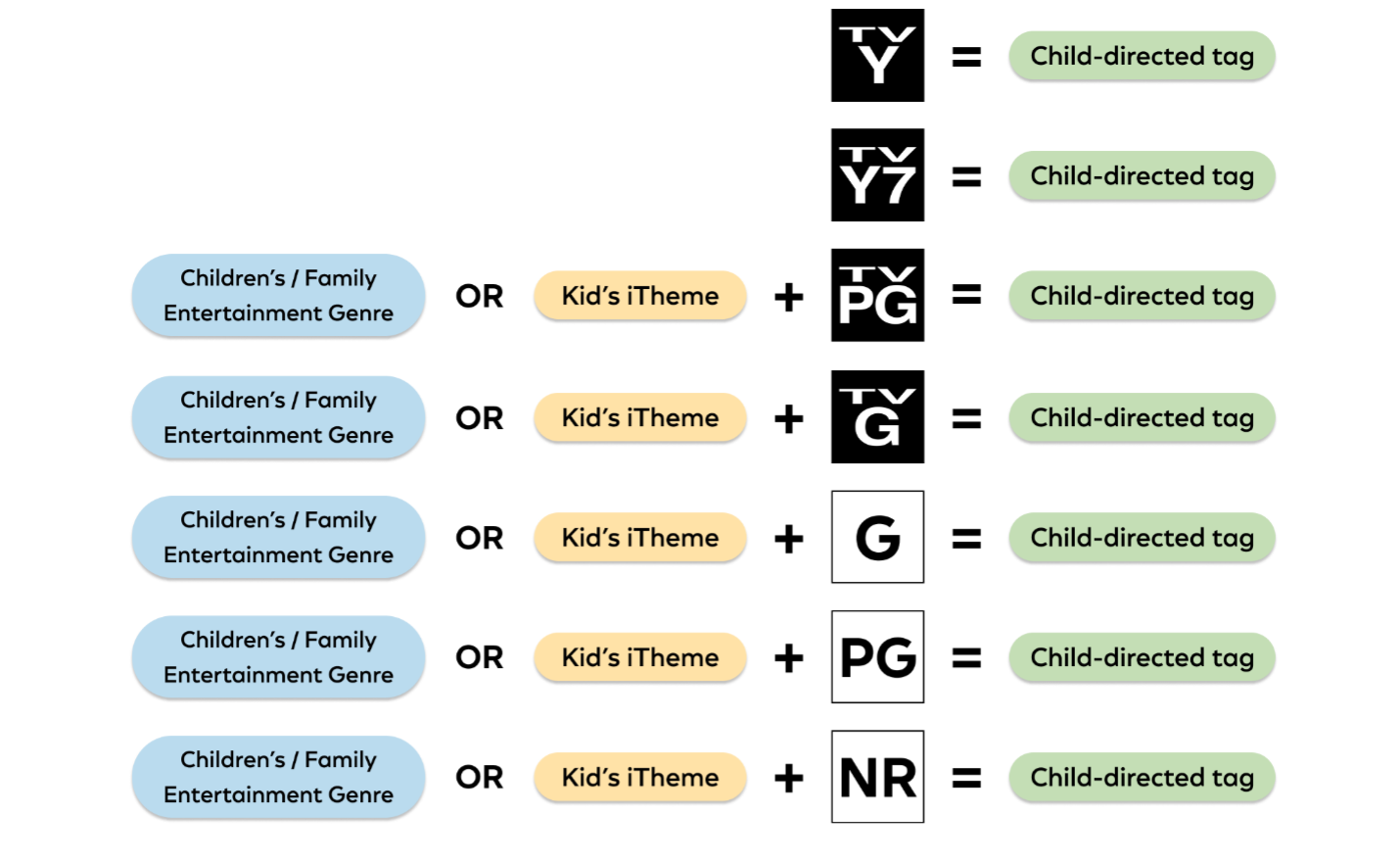
Tagging logic for child-directed content
Expect your content catalog to be tagged as child-directed if:
The app is tagged as child-directed.
The content has a rating of
TV-YorTV-Y7.The content has a rating of
TV-GorTV-PGand has the Children’s / Family Entertainment Genre tag or Kid’s iTheme.
The content has a rating of
G,PG, orNRand has the Children’s / Family Entertainment Genre tag or Kid’s iTheme.
For advertising purposes, expect your media or listing to be tagged as child-directed if:
The app is tagged as child-directed.
The media or listing rating is
TV-YorTV-Y7.The content associated with it is child-directed.
The station associated with it is child-directed.
Teen-appropriate tagging logic
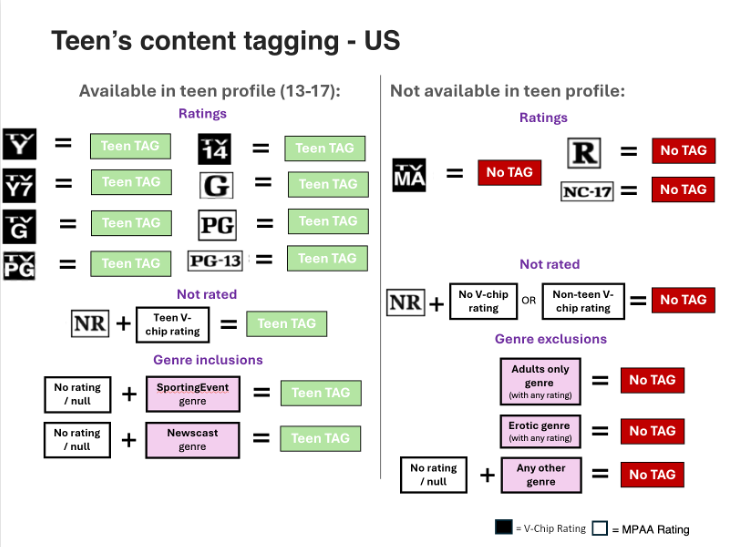
Expect your content catalog to be tagged as teen-appropriate if:
The content has a V-Chip rating of
TV-Y,TV-Y7,TV-G,TV-PG,TV-14.The content has an MPAA rating of
G,PG,PG-13.The content has an MPAA rating of NR.
and has a teen V-Chip rating.
The content has no rating but has a SportingEvent or Newscast genre tag.
Continue watching tagging
Consumers may share their viewing history between applications and the Comcast entertainment platform and can disable sharing at any time. Recommendation features can also be turned on/off by consumers at any time.
Content partners may share viewing history from their applications so users can continue content across all services in one interface. Where allowed, that data may also inform recommendations across the platform.
App partners sharing watch history with Comcast for Continue Watching must either refrain from sending child users content or include a child-directed tag consistent with guidance on sending tags for Continue Watching below, including data from children under 13 without parental consent.
Comcast uses watch history data and related tags to:
Provide continue watching tiles within our experience.
Restrict the use of watch history and any associated data in recommendation models.
Sending Continue Watching data
Include appropriate tags (including child-directed tags) with any data you send via Firebolt® APIs if you have any reason to believe it came from a child.
Sending watch history data
Watch history data powers Continue Watching and recommendations features across the platform.
If you share third-party watch history data with Comcast and have reason to believe the data came from a child or teen, you must send the appropriate agePolicy() tag value (i.e., ’app:child’ or ’app:teen’) in the payload of the Firebolt Discovery.watched() API.
Some conditions where you should send child-directed tags with your watch history data are:
The data was generated while logged into a child profile.
The data was generated during playback of content directed to children.
The data was generated during playback launched from sections of the app experience directed to children (e.g., playback launched from a children’s page, rail, or feed).
You have any other reason to believe the viewer of the playback session is a child.
If you send a child or teen tag on watch history data, the platform will temporarily drop the watch history data and not use it to deliver Continue Watching tiles. Specifically, when you send a child-directed tag on watch history data, the platform:
Will not use the watch history data to power content recommendation models.
Will not use data derivative of the watch history data (e.g., click on the Continue Watching tile) to power content recommendation models.
App metrics tagging
The platform uses app metric data for targeted advertising and audience segmentation. However, the app metrics data needs a child-directed tag when the data comes from a child.
If you share third-party app metric data with us and have reason to believe the data came from a child, you must send a child-directed agePolicy() tag on the data via the associated Firebolt Metrics method calls. All metrics methods except appInfo() support the agePolicy tag.
Behavioral advertising and parental consent
Persistent identifiers collected from children should not be used for behavioral advertising. Additionally, parental consent is required to share children’s personal information with third parties for advertising purposes.
Some conditions where you must apply child-directed tags to app metric data are:
The data was generated while logged into a child profile.
The data was generated during playback of content directed to children.
The data was generated during playback launched from sections of the app experience directed to children (e.g., playback launched from a children’s page, rail, or feed).
You have any other reason to believe the viewer of the playback session is a child.
If you send a child-directed tag on app metric data, the platform will enforce child-specific delete requirements for the app metric data and data derivative of the app metric data. Specifically, when you send a child-directed tag on app metric data, the platform:
Will not use the app metric data for targeted advertising or audience segmentation use cases.
Will not use data derivative of the app metric data for targeted advertising or audience segmentation use cases.
Ad call tagging
If you share ad inventory with Comcast Advertising (formerly Effectv and FreeWheel) and have reason to believe that the viewer during the playback session is a child or teen, you must send at least one of the industry-accepted Interactive Advertising Bureau (IAB) flags, COPPA flags, or Limit Ad Tracking (LAT) signals on ad calls to Comcast Advertising.
If you use Comcast Advertising: Follow the Comcast Advertising documentation for COPPA flag, IAB, or LAT flag implementation.
If you use any other ad server:
When dealing with child viewers, encode macros to pass
_fw_coppain the ad call.When dealing with teen viewers, encode macros to pass
_fw_is_latorgpp/gpp_sidwith appropriate settings in accordance with IAB Global Policy Protocol (GPP) specifications.
Some conditions where you must apply COPPA flags or LAT signals to ad calls are:
The user is logged into a child or teen profile during the playback session.
The content being viewed during the playback session is directed to children.
The playback session was launched from an experience within the app directed to children.
You have any other reason to believe the viewer of the playback session is a child or teen.
If you send an appropriately encoded COPPA, IAB, GPP or Limit Ad Tracking flag on the ad call, Comcast Advertising won’t return any targeted ads in response to the ad call.
Impacts of child and teen tagging
Child and teen tagging impacts app launch intents, content curation, advertising, and personalization.
The platform enables users to access their entertainment choices across different services in a single place. To do so, we lift content out of the applications, making it easier for consumers to discover content more efficiently. By understanding users’ preferences, we guide them to the content they want, no matter which service provides it.
By doing so we sometimes allow consumers to click on deep links directly into content, enabling them to launch into a particular part of provider apps/services. This gives us insight into what they are requesting to watch.
Impact on platform content curation
To make the experience easier to navigate, we also curate content by high-level interest or appropriateness categories, as well as user preferences—including favorited content, device interactions, past usage, and viewing behaviors.
Child-directed areas and child profiles display exclusively child-directed content and apps
Only apps that certify, in accordance with regional legal requirements, as being entirely child-directed, or apps with sections intended for children with proper controls around those children experiences will appear in child-directed areas and profiles.
Additionally, content or apps with child-directed tags may also appear in non-child-directed areas across other portions of our experience (e.g., household or adult profiles) in a non-discriminatory fashion.
Child-directed areas curation
One way we curate content is in child-safe and teen appropriate sections, which are available on products with and without profiles. Only content with a child-directed tag will appear in child-directed areas (like Kids zone or eventually a child profile).
Profile curation
Products that support profiles use child and teen profiles to provide a dedicated environment for age appropriate content based on content ratings and genres. Only content with child-directed tags will appear in child profiles, and only content with teen-appropriate tags will appear in teen profiles.
Impact on app launch intents
When a user launches an app on their device, the platform may send the app an agePolicy and/or profilePolicy context signal within the Launch Intent.
The platform will send the agePolicy context signal with the appropriate 'app:child' or 'app:teen' tag value when a user successfully:
Launches child-directed app content from our platform.
Launches a fully child-directed app.
Launches an app from a child directed section of the UI (a page, rail, or feed).
Launches an app from a child profile.
Launches an app from a teen profile.
Additionally, the platform will send the profilePolicy context signal with the appropriate 'childProfile' or 'teenProfile' tag value when a user successfully:
Launches an app from a child profile.
Launches an app from a teen profile.
Context signal examples
{
  "context": {
    "agePolicy": "app:child",
    "profilePolicy": "childProfile"
  }
}
{
"context": {
"agePolicy": "app:teen",
"profilePolicy": "teenProfile"
}
} {
"context": {
"profilePolicy": "householdProfile"
}
} {
"context": {
"agePolicy": "app:child",
"profilePolicy": "householdProfile"
}
} Impact on content curation
Child-directed tags determine which content and apps are placed in child profiles and in child-directed parts of the UI (pages, rails, or feeds). Likewise, teen-appropriate tags determine which content and apps are placed in teen profiles. These tags impact content curation in the following ways.
For content
The platform only places child-directed content in child profiles and child-directed parts of the UI (e.g., only child-directed movies go in a “Kids movies” rail).
The platform only places teen-appropriate content in teen profiles.
For app and channel tiles
The platform does not place app tiles for apps that aren’t fully child-directed in child-directed parts of the UI.
Exception: unless the app tile leads to child-directed app content.
The platform does not place tiles for non-child-directed linear channels in child-directed parts of the UI.
Exception: unless the linear channel tile directs to child-directed linear channel content.
The platform does not place app tiles for apps that are intended for adults only in teen profiles.
For Now/Next rails
If the Now/Next rail is presented in a child-directed page, the rail will only present child-directed channels.
If the user selects “view all” from the Now/Next rail in a child-directed page, the user will land on the kids category within the TV guide.
Impact on the advertising experience
Child tags, teen tags, COPPA flags, and LAT disable targeted advertising in child-directed and teen-appropriate areas (i.e., sections, content, profiles). Specifically, targeted advertising is disabled:
During dynamic ad insertion in content with child-directed tags.
Display advertising in child-directed sections of the experience (e.g., a kids section) when our editorial team places a child-directed tag on that page, rail, or feed.
Across the entirety of child and teen profiles (i.e., there is no targeted advertising within child and teen profiles).
For shared ad inventory, to ensure targeted advertising is disabled, the App must send IAB COPPA flags, child tags, teen tags, or LAT on ad calls made to Comcast Advertising (refer to Ad call tagging above). In response, targeted advertising will be disabled during dynamic ad insertion for shared ad inventory.
Opt-in/out status
Platform settings have an option to opt out of targeted advertising. The default status is opt-in, but child-directed content that is tagged as such and child-directed areas will never have targeted advertising, regardless of the selected status.
Impact on personalization
Recommendations provide users with content they might like to watch.
Platform recommendations display the same recommendations to all users and are based on viewing data from all devices, while
Personalized recommendations are based on the user’s watch history and are unique to the device.
We can use these recommendation features to generate an automated feed of content or to apply sorting to a rail that has already been created.
Types of recommendations
Platform recommendations:
More Like This – provides up to 15 recommendations that are similar to the current program (on showpages).
Last Night’s TV – returns top 20 programs shown on linear last night that are also available on VOD (not currently enabled on EntOS in North America)
Trending This Week – displays top 20 programs in the past 7 days that are available on VOD (not currently enabled on EntOS in North America)
Browse Rank – reorders tiles within rails by overall popularity
Personalized recommendations:
Because You Watched – uses customer viewing history from past 60 days and metadata tags to recommend similar content
Sorted List – Reorders tiles within rails so programs more relevant to the user are displayed first (based on viewing history from the past 90 days).
In the US, there are 3 main cases where we do not currently use children’s or teen’s data to feed recommendations:
Children’s watch history data shared by the app (i.e., watch history data sent with a
childagePolicytag)Data derivative of children’s watch history data shared by the app (e.g., a child clicking on a Continue Watching tile)
Platform usage data generated while logged into a child or teen profile.
Some content is always excluded from recommendations
Adult content, trailers, clips, and standalone sport events are always excluded from recommendations.