This document details additional requirements for apps that utilize specific platform integrations.
These requirements only apply if your app uses corresponding integration(s). If you are interested in a particular integration, submit a ticket or contact your partner manager.
Search and discovery
In order to have your app's content fully surfaced in aggregated experiences, Firebolt Search and Discovery APIs must be integrated.
Metadata Integration enables your app's content to have a deeper and more prominent exposure in search and discovery experiences. Refer to the Metadata Specifications for specific information on fields used in the metadata feed.
Deep Linking enables your app to be launched or brought to the foreground with a specific entity, search, player, or other section already loaded.
Voice Commands allow your users to speak to their remotes to navigate, search, and control their experience via voice.
SD-01 Accessibility metadata labeling
Previous ID(s): A3
- Your app's content catalog is published via OpenIngest
- Content assets have closed captions (subtitles) and/or Audio Description available
Where an application's content catalog is published via OpenIngest, and a program is available with closed captions (subtitles) and/or Audio Description, this should be signaled in the metadata for the relevant asset. This will then be labeled wherever the program is merchandised in the platform interface.
Additional notes:
- Signaling of Sign Languages (e.g. BSL, DGS, LIS) are not yet supported via OpenIngest. This capability will be notified once available.
Acceptance criteria
As a user, I want to see clear labels for programs with closed captions (subtitles) and/or Audio Description and/or Sign Language, so that I can easily identify and select accessible content available within the app.
Publishing content catalog with accessibility metadata
- Given the content catalog is published via OpenIngest,
- When a program has closed captions (subtitles) and/or Audio Description available,
- Then the metadata for each program should indicate the availability of these accessibility features.
Viewing accessibility labels in the platform UI
- Given I am in the platform UI,
- When I select a piece of app content,
- Then the Show Page will display under the program title the availability of accessibility features.
SD-02 Guard word search
Previous ID(s): V2
- Your app is Firebolt enabled
- Your app has search capabilities and understands the Search Intent
Sky uses key intents when deep-links are selected from the Sky experience and passed to an app to determine the right behaviour for the customer. The Search Intent goes to an app with a search term populated, and brings that app to the foreground, if needed.
Additional notes:
- This requirement includes all generic searches, including any entity search (e.g. programme, genre, person, team, competition) where a guard word is used.
- For non-title searches, e.g. "Brad Pitt movies on Amazon" or "comedies on Amazon", the ideal experience is to land customers onto a search page in the app containing results related to the entity search.
- If no results are found, the error handling/subsequent journey should be handled by the app.
Acceptance criteria
As a customer, I want to search for content specifying an app name and be directly taken to the content within the app stated.
In-app search support
- Given the customer is in the Sky UI or any app,
- When they do a search and specify the app name and the app supports in-app search,
- Then the search term will be passed to the app provider and the app will do the search, which could mean the customer lands on the title or a search page of the app.
No in-app search support
- Given the customer is in the Sky UI or any app,
- When they do a search and specify where they want to watch it and there is no in-app search support,
- Then the app should still launch and no in-app search will be performed.
Sign-in or profile selection required
- Given the customer has specified an app where sign-in and/or profile selection is required to view content,
- When the search journey launches that app,
- Then the sign-in and/or profile selection journey will be added before the customer lands on the search results (or app).
Explicit intent or unavailable content
- Given the customer's query contains another indication of intent (e.g. "play/show/search X on Amazon"), or the content searched for is not available on the specified app,
- When the search is submitted,
- Then the named app will still be launched and the search string will still be passed to it, regardless of content availability or in-app search support.
Searching while already in the specified app
- Given the customer is already in the app matching the guard word of their search,
- When they search for content specifying that same app's guard word,
- Then the search will happen in-app if supported, or nothing will happen if not supported; either way, the app will not reload.
Example searches
Sky will pass the voice query and the partner should handle this within their app.
Entertainment / video searches
| Type | Example |
|---|---|
| Content title search | "The Little Mermaid on Disney+" |
| Genre / category | "Comedy movies on Amazon Prime" |
| Person | "Brad Pitt on Prime" |
Music / audio searches
| Type | Example |
|---|---|
| Artist | "Taylor Swift on Spotify" |
| Track / playlist | "Running Playlist on Spotify" |
| Podcast title | "Desert Island Discs on BBC Sounds" |
| Genre / category | "00s Pop Punk on Spotify" or "Comedy Podcasts on BBC Sounds" |
| Albums | "Lemonade on Spotify" |
| Soundtracks | "Encanto soundtrack on Spotify" |
| Eras | "90s music on Spotify" |
| Moods | "Good Energy on Spotify" |
| Activity | "Baking Music on Spotify" |
| Radio station | "Capital FM on Global Player" |
| Combination of the above | "Somewhere Over the Rainbow by Eva Cassidy on Spotify" |
Fitness searches
| Type | Example |
|---|---|
| Trainer name | — |
| Type of workout | "Cardio workouts on FiiT" |
| Duration | "30 minute workouts on FiiT" |
| Ability level | "Beginner workouts on FiiT" |
| Target body part / area | "Ab workouts on FiiT" |
Gaming searches
| Type | Example |
|---|---|
| Content title | "Tetris on Play.Works" |
| Genre / category | "Platform Games on Play.Works" |
Example flows
When going through the below flows, customers may have to pick a profile or sign-in where relevant.
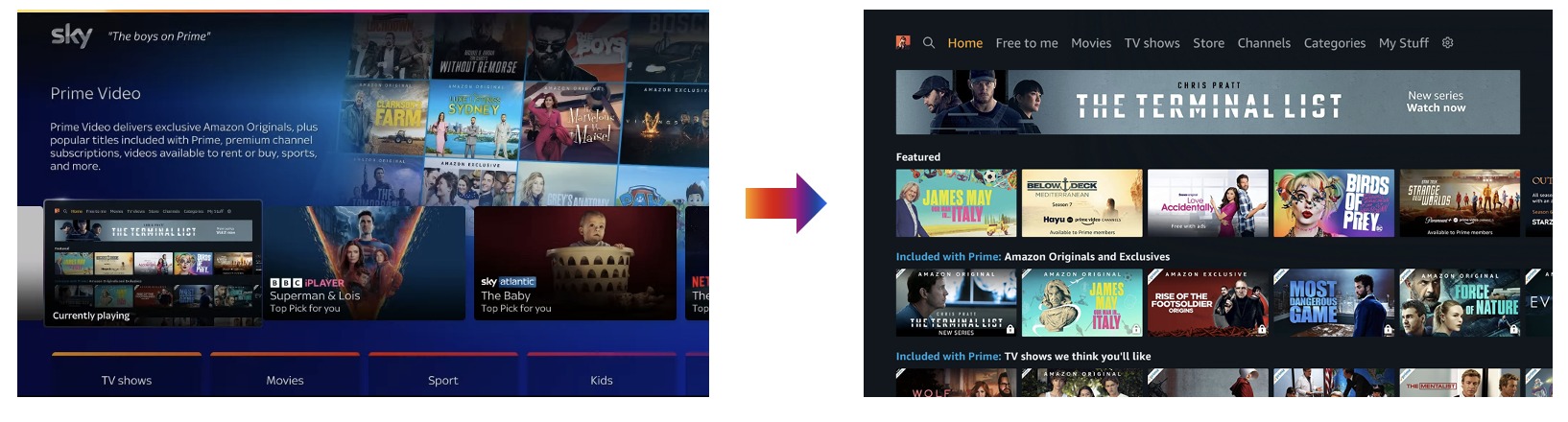
Partner does nothing
Customer will be taken to the app that they have used as the guard word, and will be brought to one of the following pages:
- Sign in page
- Profile page
- Homepage
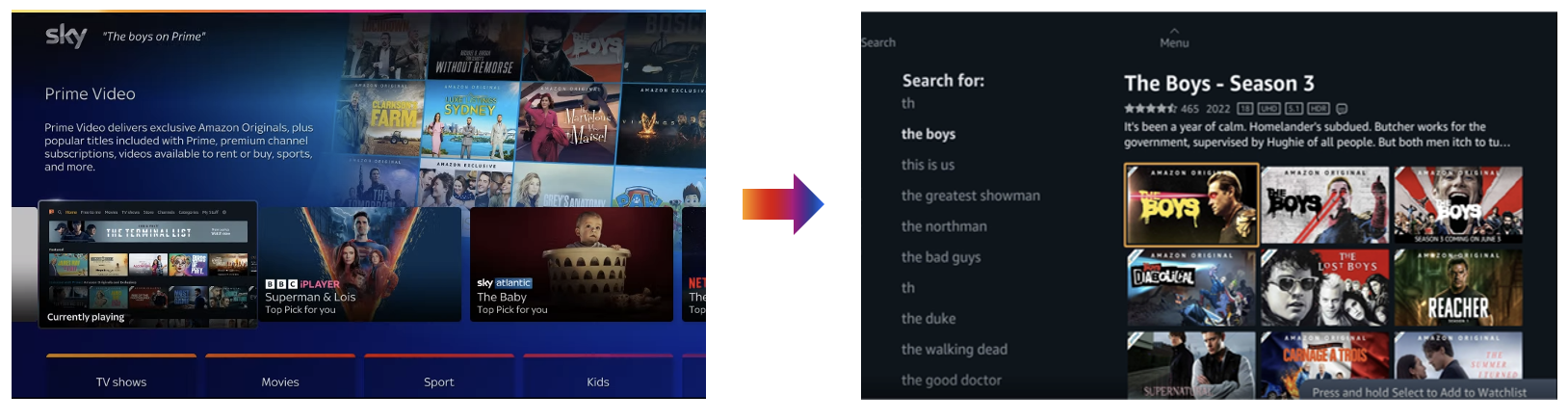
Partner enables guard word
Customer will be taken to the relevant search results, depending on how the app’s search works and depending on what they searched. Options include:
- Search results page
- Show page
- Suggestions
- Error (no results found)
SD-03 In-app search journeys
Previous ID(s): V3
- Your app is Firebolt enabled
- Your app has search capabilities and understands the Search Intent
Sky uses key intents when deep-links are selected from the Sky experience and passed to an app to determine the right behaviour for the customer. The Search Intent goes to an app with a search term populated, and brings that app to the foreground, if needed.
Acceptance criteria
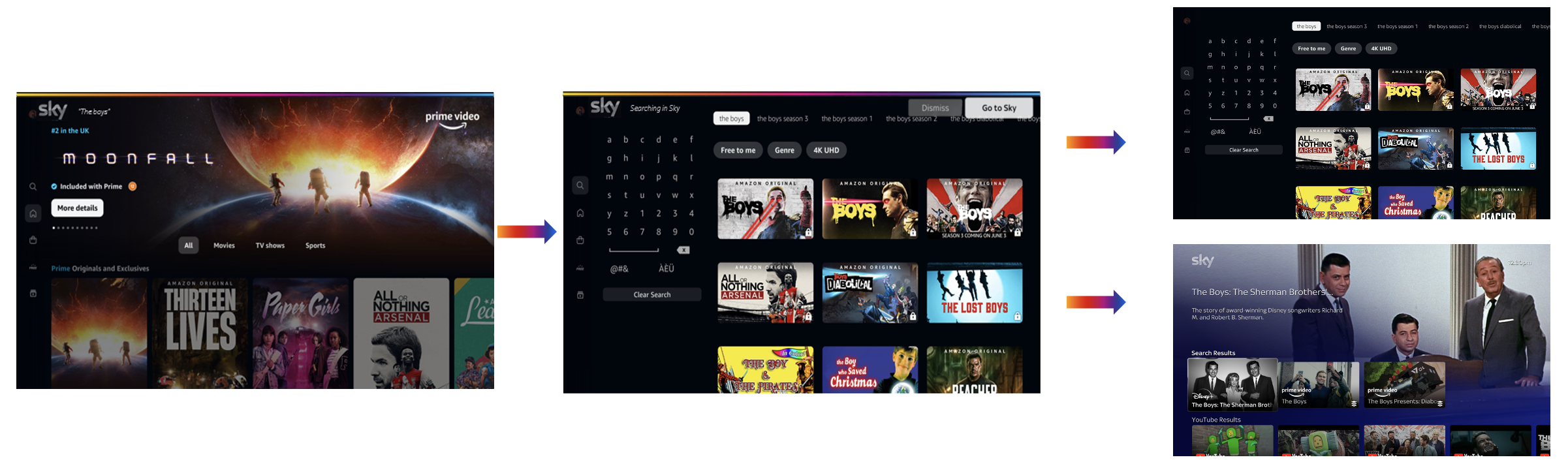
As a customer, when I am in an app and I do a voice search, I want the piece of content that I have searched for searched in the app as well as in the Sky catalogue. When the results are found, I then want to be presented with the option of staying in the app or going back to Sky for a wider selection of search results.
Voice search while in an app
- Given a customer is in an app,
- When they do a voice search and the app supports Search Intent,
- Then the app should search for the query the customer has said, the customer will be shown in-app results for the query, and a voice overlay will give them the option to find more results outside of the app if required.
Examples
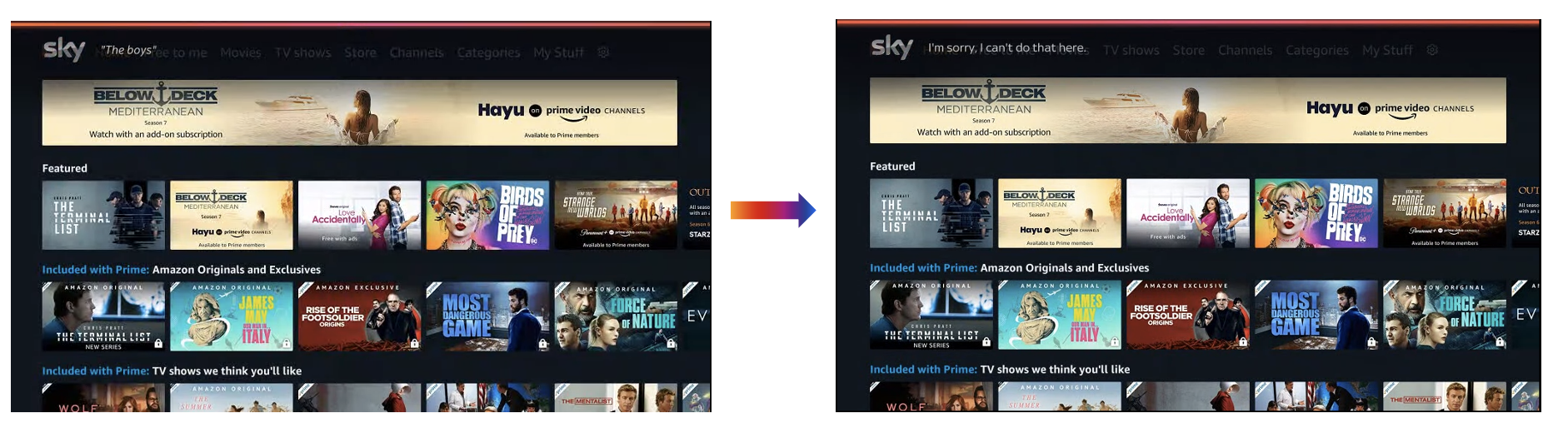
Partner does nothing
Partner enables in-app voice
Kids Section
KS-01 Option 1a: launching straight into a kids profile
Previous ID(s): KS1
Your app should open kid section deep links within kid profiles.
Acceptance criteria
As a user, I want to ensure that the Kids Section is a safe place for my kids to browse without being able to access inappropriate content through third party apps.
Scenario prerequisites:
- The user is browsing the kids super section of the UI
- The user launches an app either via a deep link to kids content or from the apps rail
- Kids profiles should only include content rated 0 or 6
When a single kids profile has been created previously
- Given I am launching an app via a deep link from the Kids Section and have previously created a kids profile in the app,
- When the app launches,
- Then I should be taken straight to the show page (from no resume point)/ playback (from a resume point) within a kids profile that I have already created.
When multiple kids profiles have been created previously
- Given I am launching an app via a deep link from the Kids Section and have previously created multiple kids profiles in the app,
- When the app launches,
- Then I should be taken to the app profile screen to choose which profile I should watch from.
When no kids profiles have been created
- Given I am launching an app via a deep link from the Kids Section,
- When the app launches,
- Then I should be taken straight to the show page (from no resume point)/ playback (from a resume point) within a default kids profile.
Example flows
Launching an app via a deep-link, into Kids profile with no profile set up:

Launching an app via a deep-link, into Kids profile with multiple profiles:

Launching an app via a direct app launch, into Kids profile with no profile set up:

Launching an app via a direct app launch, into Kids profile with multiple profiles:

KS-02 Option 1b: changing profiles
Previous ID(s): KS2
Your app should present a form of parental control before accessing an adult profile.
Acceptance criteria
As a user, I want to ensure that the Kids Section is a safe place for my kids to browse without being able to access inappropriate content through third party apps.
Scenario prerequisites:
- The user launches an app either via a deep link to Kids content or from the apps rail
- The user tries to change profile from within the app
- Kids profiles should only include content rated 0 or 6
Having launched app directly into Kids profile via platform Kids Section
- Given that I've launched the app directly into a kids profile via the app platform Kids Section,
- When I go to change profiles from within the app,
- Then I should have a form of parental controls challenges (e.g., PIN challenge), before I can access an adult profile.
KS-03 Option 2a: launching via profile screen
Previous ID(s): KS3
Your app should open Kids Section deep links within Kids profiles.
Acceptance criteria
As a user I want to ensure that the Kids Section is a safe place for my kids to browse without being able to access inappropriate content through third party apps.
Scenario prerequisites:
- The user is browsing the kids super section of the UI
- The user launches an app either via a deep link to kids content or from the apps rail
- Kids profiles should only include content rated 0 or 6
Launching an app via deep link from Kids Section when kids profiles have been created previously
- Given I am launching an app via a deep link from the Kids Section and have previously created a kids profile in the app,
- When the app launches,
- Then I should be taken straight to the show page (from no resume point)/ playback (from a resume point) within a kids profile that I have already created.
Launching an app via deep link from Kids Section when multiple kids profiles have been created previously
- Given I am launching an app via a deep link from the Kids Section and have previously created multiple kids profiles in the app,
- When the app launches,
- Then I should be taken to the app profile screen to choose which profile I should watch from.
Launching an app via deep link from Kids Section when no kids profiles have been created
- Given I am launching an app via a deep link from the Kids Section,
- When the app launches,
- Then I should be taken straight to the show page (from no resume point)/ playback (from a resume point) within a default kids profile.
Example flows
Launching an app via a deep-link, profile screen before playback:
Launching an app via a direct app launch, profile screen before playback:
KS-04 Option 2b: launching via profile screen while app is in background active mode
Previous ID(s): KS4
Your app should take the user to the app profile screen or return to the kids profile when selecting a deep link from a Kids Section while the app is in Background Active mode.
Acceptance criteria
As a user I want to ensure that the Kids Section is a safe place for my kids to browse without being able to access inappropriate content through third party apps.
Scenario prerequisites:
- The user is browsing the kids super section of the UI
- The app is already in Background Active mode (see Firebolt® Lifecycle States Requirements) from previous browsing
- The user launches an app either via a deep link to kids content or from the apps rail
Having left app in Background Active while browsing UI
- Given I've left the app in Background Active mode as I browse the UI,
- When I select a deep-link for the same app from the Kids Section,
- Then I should either be taken to the app profile screen to choose which profile I should watch from OR I should be returned back to the Kids profile section.
Partner Page (PP)
The partner page relies on the use of RSS feeds. For more information on integrating partner page RSS feeds visit the Partner Page RSS documentation.
PP-01 Partner Page – Featured Rail
Previous ID(s): PP1
Example: Featured Rail UI
- You have provided the platform with a valid RSS feed
- The app metadata for each content asset in the feed must have already been ingested.
You must dictate which content should be displayed in your app's 'featured rail' within the platform's Partner page UI.
Additional notes:
- Content to be displayed in featured rail, is for the partner to dictate.
- Should avoid duplication with most popular rail.
- Currently, only individual content assets (shows) can appear in the rail.
Acceptance criteria
As a user, I want to see an area dedicated to the content from a particular partner app.
Viewing Featured Rail from device UI
- Given I am on the device UI,
- When I go to a partner page,
- Then content in the featured rail should appear and deep link into the app content.
Selecting content from Featured Rail
- Given I am on the partner page,
- When I click on a content tile in the Featured rail,
- Then the app should launch to the correct content deep link.
PP-02 Partner Page – Most Popular Rail
Previous ID(s): PP2
- You have provided the platform with a valid RSS feed
- The app metadata for each content asset in the feed must have already been ingested.
You must dictate which content should be displayed in your app's 'most popular rail' within the platform's Partner page UI.
Additional notes:
- Content to be displayed in most popular rail is for the partner to dictate.
- Should avoid duplication with featured rail.
- Currently, only individual content assets (shows) can appear in the rail.
Acceptance criteria
As a user, I want to see an area dedicated to the content from a particular partner app.
Viewing Most Popular Rail from device UI
- Given I am on the device UI,
- When I go to a partner page,
- Then content in the most popular rail should appear and deep link into the app content.
Selecting content from Most Popular Rail
- Given I am on the partner page,
- When I click on a content tile in the most popular rail,
- Then the app should launch to the correct content deep link.
Advertising (AT)
AT-01 Fast forwarding within an ad break
Previous ID(s): AT1
Users should be able to fast-forward and scrub through ad breaks and resume playback as expected. The player should also support the same FFWD and/or Scrub Forward Requirements across content and ad breaks.
Additional notes:
- The 'Ad Fast Forward Tier' is indicated via Firebolt Policy method within skipRestriction object.
- "None" is the equivalent for fast-forward/scrubbing being allowed across content and ad breaks
Acceptance criteria
Scenario prerequisites:
- User is in content.
FFWD or scrub forward behavior through ad break
- Given that a user has initiated FFWD and/or scrub forward in an ad break,
- Then: the user should be taken through that ad break at an accelerated speed that matches up to the maximum FFWD and/or scrub forward speed supported by the player (minimum requirements listed below)
- And the FFWD should persist, at the same speed, until the end of the ad-break or the user aborts FFWD,
- And when FFWD through the ad-break completes, playback should resume in content with no black screens, the FFWD should not pause or be interrupted by buffering or other visible transitions/ inconsistencies.
Resuming playback after FFWD or scrub forward in ad break
- Given that a user has initiated FFWD and/or scrub forward in an ad break,
- When the user play/resumes while in the ad break,
- Then playback of ad break should resume at 1x speed,
- And playback should resume at an advanced position in the ad break that represents the progress the user made through FFWD,
- And playback should not reset to the start of the ad-break,
- And there should be no abrupt changes in the UI or visual indicators that could confuse the user when switching back to normal playback (e.g., no large jumps in playhead position or countdown timer).
Fast-forward start during ad break
- Given I am watching an ad break,
- When I fast-forward,
- Then the ad-break must fast-forward within 0.5 seconds.
Fast-forward speeds during ad break
- Given I am watching an ad break,
- When I fast-forward,
- Then the ad break must fast-forward at the following multiple speeds x2, x6, x12, x30. (mirroring previous Trickplay requirements).
Scrubbing experience during ad break
- Given I am watching an ad break,
- When I move the audio track or video selector to a specific time,
- Then the content must move to that point within 2 seconds.
AT-02 Rewinding within an ad break
Previous ID(s): AT2
Users should be able to rewind and scrub through ad breaks and resume playback as expected. The player should also support the same FFWD and/or Scrub Forward requirements across content and ad breaks.
Additional notes:
- The 'Ad Fast Forward Tier' is indicated via Firebolt Policy method within skipRestriction object.
- "None" is the equivalent for fast-forward/scrubbing being allowed across content and ad breaks.
Acceptance criteria
Scenario prerequisites:
- User is in content.
Having initiated FFWD or scrub forward in content
- Given that a user has initiated FFWD and/or scrub forward in content,
- When the player comes across an ad break,
- Then the FFWD should persist, at the same speed, across content and the ad break and back into content, or until the user aborts FFWD,
- And the FFWD should not pause or be interrupted by ad breaks,
- And the FFWD should not pause or be interrupted by buffering or other visible transitions/inconsistencies.
Fast-forward start during content
- Given I am watching content,
- When I fast-forward,
- Then content and ad break(s) must fast-forward within 0.5 seconds.
Fast-forward speeds during content
- Given I am watching content,
- When I fast-forward,
- Then content and ad break(s) must fast-forward at the following multiple speeds: x2, x6, x12, x30 (mirroring previous Trickplay requirements).
Scrubbing experience during content
- Given I am watching content,
- When I move the audio track or video selector to a specific time,
- Then the content must move to that point within 2 seconds.
AT-03 Fast forwarding initiated in content and continues across mid-rolls
Previous ID(s): AT3
Users should be able to fast-forward and scrub through ad breaks and resume playback as expected across mid-rolls. The player should also support the same rewind KPIs across content and ad breaks:
Additional notes:
- The 'Ad Fast Forward Tier' is indicated via Firebolt® Policy method within skipRestriction object.
- "None" is the equivalent for fast-forward/scrubbing being allowed across content and ad breaks.
Prerequisite: User is in content.
Acceptance criteria
Rewind or scrub back behavior through ad break
- Given that a user has initiated rewind and/or scrub back in an ad break,
- When the user performs these actions,
- Then the user should be taken through that ad break at an accelerated speed that matches up to the maximum rewind speed and/or scrub back speed supported by the player,
- And rewind should persist, at the same speed, until the end of the ad break or the user aborts rewind,
- And when rewinding through the ad break has completed, playback in content should resume,
- And rewind should not pause or be interrupted by buffering or other visible transitions/inconsistencies.
Resuming playback after rewind or scrub back in ad break
- Given that a user has initiated rewind and/or scrub back in an ad break,
- When the user aborts rewind or hits play while in the ad break,
- Then playback of ad break should resume at 1x speed,
- And playback should resume at an earlier position in the ad break that represents the progress the user made through rewinding,
- And there should be no abrupt changes in the UI or visual indicators that could confuse the user when switching back to normal playback (e.g., no large jumps in playhead position or countdown timer).
Rewind start during ad break
- Given I am watching an ad break,
- When I rewind,
- Then the ad break must rewind within 0.5 seconds.
Rewind speed during ad break
- Given I am watching an ad break,
- When I rewind,
- Then the ad break must rewind at the following multiple speeds: x2, x6, x12, x30 (mirroring Trickplay requirements).
Scrubbing experience during ad break
- Given I am watching an ad break,
- When I move the audio track or video selector to a specific time,
- Then the content must move to that point within 2 seconds.
AT-04 Rewinding initiated in content and continues across mid-rolls
Previous ID(s): AT4
Users should be able to rewind and scrub through ad breaks and resume playback as expected across mid-rolls. The player should support the same rewind requirements across content and ad breaks.
Additional notes:
- The 'Ad Fast Forward Tier' is indicated via Firebolt® policy method within
skipRestrictionobject. - "None" is the equivalent for rewind/scrubbing being allowed across content and ad breaks.
Prerequisite: User is in content.
Acceptance criteria
Having initiated rewind or scrub back in content
- Given that a user has initiated rewind or scrub back in content,
- When the player comes across an ad break,
- Then Rewind should persist, at the same speed, across content and the ad break and back into content, or until the user aborts Rewind,
- And Rewind should not pause or be interrupted by ad breaks,
- And Rewind should not pause or be interrupted by buffering or other visible transitions/inconsistencies.
Rewind start
- Given I am watching content,
- When I rewind,
- Then content and ad break(s) must rewind within 0.5 second.
Rewind speeds
- Given I am watching content,
- When I rewind,
- Then content and ad break(s) must rewind at the following multiple speeds: x2, x6, x12, x30 (mirroring previous Trickplay requirements).
Scrubbing experience during content
- Given I am watching content,
- When I move the audio track or video selector to a specific time,
- Then the content must move to that point within 2 seconds.
AT-05 Ad Trickplay UI / visual cues
Previous ID(s): AT5
Users should not be presented with black screens, error screens, or any visible transitions when resuming from fast-forward, rewind, or scrub state.
Acceptance criteria
Visual cues during Trickplay in ad break
- Given a user has initiated FFWD, rewind, and/or scrub in an ad-break,
- When the user performs these actions,
- Then black screens, error screens, or other visible transitions/inconsistencies should not be presented at any point during the FFWD, rewind, or scrub journey,
- And Trickplay UI elements displayed should be consistent with the user interface for Trickplay during content,
- And Trickplay UI elements should display until the user aborts FFWD or rewind,
- And the user should get a visual indication of progress in time via the Player UI elements, preferably with a countdown of time left in the ad-break and an updated timeline.
Visual cues when resuming playback after Trickplay in ad break
- Given a user has initiated FFWD, rewind, and/or scrub in an ad-break,
- When the user plays/resumes while in the ad-break,
- Then play/resume should not display black screens, error screens, or other visible transitions/inconsistencies.
Having not attempted Trickplay or playback control
- Given that a user has not attempted Trickplay or attempted to control playback in any way,
- When normal viewing occurs,
- Then the Ad Trickplay UI should not be invoked.
AT-06 Advert quality
Previous ID(s): AT6
Advertisements should be in HD (high definition).
AT-07 Exiting playback session after ad break
Previous ID(s): AT7
User should be returned to playback at the same point they left without ad breaks when resuming.
Acceptance criteria
Scenario prerequisites
- User has fully watched an ad break (pre, mid, or post roll) to 100% at 1x speed.
- User has started watching content in app.
User has fully watched an ad break and started watching content
- Given the user has fully watched an ad break and started watching content in app,
- When the user exits the playback session and then resumes playback (via Continue Watching or selecting the same episode),
- Then the user must return to playback at the exact same point they left and no ad break is served on resume.
AT-08 Exiting playback session during ad break
Previous ID(s): AT8
Playback must resume from the start of the ad-break when users exit the playback session and then resume playback.
Acceptance criteria
User in ad break
- Given the user is in an ad break,
- When the user exits the playback session and then resumes playback (via Continue Watching or selecting the same episode),
- Then playback resumes from the start of the ad break again.
AT-09 Separate premium ad skip experience supersedes Ad Tier entitlement
Users with entitlements to skip advertisements should have the ability to Trickplay ads.
Additional notes:
- Pause, play, rewind, and scrub back actions must never be suppressed, irrespective of Ad Tier entitlement.
Acceptance criteria
Scenario prerequisites:
- User is subscribed to the app platform over IP and thus has an "Ad Tier" or "Ad Fast Forward Tier" entitlement assigned by the app platform.
- User currently pays for a separate premium ad-skip or ad fast-forwarding experience with the app itself that is not part of an app platform entitlement.
User subscribed to "Ad Fast Forward Tier" - premium ad skip supersedes
- Given that a user has initiated playback in app and the user is subscribed to the app platform 'Ad Fast Forward Tier',
- When playback occurs,
- Then the user should be able to Trickplay ads (FFWD, scrub ahead/back, rewind ads, pause/play) in the app.
User subscribed to "Ad Tier" with separate premium ad-skip - premium supersedes
- Given that a user has initiated playback in app and the user is subscribed to the app platform 'Ad Tier' and the user currently pays for a separate premium ad-skip / ad fast-forwarding experience with the app itself,
- When playback occurs,
- Then the user should be able to Trickplay ads (FFWD, scrub ahead/back, rewind ads, pause/play) in the app.
AT-10 Ad Trickplay Experience must match a user's Ad Tier entitlement
The ability to Trickplay ads should reflect the user's Ad Tier entitlement.
Additional notes:
- Pause, play, rewind, and scrub back actions must never be suppressed, irrespective of Ad Tier entitlement.
Acceptance criteria
Scenario prerequisites:
- User is subscribed to the app platform over IP and thus has an 'Ad Tier' or 'Ad Fast Forward Tier' entitlement assigned by the app platform.
- User does not currently pay for a separate premium ad-skip / ad fast-forwarding experience with the app itself that is independent of an app platform entitlement.
User subscribed to "Ad Fast Forward Tier" - Trickplay allowed
- Given that a user has initiated playback in app and the user is subscribed to the app platform 'Ad Fast Forward Tier',
- When playback occurs,
- Then the user should be able to Trickplay ads (FFWD, scrub ahead/back, rewind ads, pause/play) in the app.
User subscribed to "Ad Tier" - Trickplay restricted
- Given that a user has initiated playback in app and the user is subscribed to the app platform 'Ad Tier',
- When playback occurs during ad-breaks,
- Then the fast-forward and scrub ahead Trickplay actions must be suppressed during ad-breaks (subject to "Relax Viewing" requirement below) and playback of the ad-break must continue at 1x speed.
AT-11 No Trickplay restrictions during content playback
Trickplay should not be restricted over primary content playback.
Additional notes:
- Trickplay should only be restricted over ad break content.
Acceptance criteria
Scenario prerequisites:
- User is subscribed to 'Ad Tier'.
- User is watching primary content.
User subscribed to "Ad Tier" and watching primary content
- Given the user is subscribed to "Ad Tier" and is watching primary content,
- When playback occurs over primary content,
- Then Trickplay (FFWD / Rewind / high-speed scrub) should not be restricted over primary content playback.
AT-12 Ad markers for non-FFWD
Ad markers should display in the playback bar and appear in the exact point where the ad-break begins.
Additional notes:
- Ad markers are spots/markings on the Trickplay bar / seek bar that signal the presence of an ad-break where Trickplay is disabled.
Acceptance criteria
Scenario prerequisites:
- User is subscribed to the 'Ad Tier' and has initiated playback in app.
User subscribed to "Ad Tier" and initiates playback
- Given the user is subscribed to the "Ad Tier" and has initiated playback in app,
- When playback reaches an ad-break,
- Then ad markers should display in the seek bar / Trickplay bar and appear at the precise point in playback (in Trickplay bar) where the ad-break begins.
AT-13 "Relax View" for subsequent views of ad-breaks
Users should be able to use Trickplay on ads which have been previously viewed fully at 1x speed.
Acceptance criteria
Scenario prerequisites:
- User is subscribed to the "Ad Tier" (i.e., tier where Trickplay is suppressed on ads).
- User has already viewed an ad-break in full.
User has fully watched an ad break
- Given a user has fully watched an ad-break (Pre/Mid/Post roll) to 100% at 1x speed,
- When the user returns to the same ad-break position (by rewinding / scrubbing back to that position),
- Then Trickplay will not be restricted for this subsequent view so that the user will be able to FFWD / high-speed scrub during this ad-break on subsequent views.
AT-14 UI Notifications for Trickplay suppression
There should be a visible notification to indicate when Trickplay is not available and the user has attempted to use Trickplay.
Acceptance criteria
Scenario prerequisites:
- User is subscribed to the 'Ad Tier' where Trickplay on ads is suppressed.
- User is watching an ad-break that they have not watched before (so Relax View is not in effect and the ad-break is not FFWD-able).
Subscribed to "Ad Tier" and watching non FFWD-able ad break
- Given the user is subscribed to the "Ad Tier" and watching an ad break that is not FFWD-able,
- When the user attempts to Trickplay (FFWD / high-speed scrub) out of this ad-break,
- Then Trickplay (FFWD/high-speed scrub) should be suppressed and playback of the ad break must continue at 1x speed.
A visual notification should display to the user, informing the user that Trickplay is suppressed, that playback will resume after the ad break finishes, and how much time is left in the ad-break.
Notification should auto-dismiss so that it is not always on the screen.
AT-15 High speed scrub (jump) past multiple mid-rolls
Users must be presented with only the nearest mid-roll ad-break position before resuming content from the jump/scrub point.
Acceptance criteria
Scenario prerequisites:
- User has started watching content in app.
- The content has 2 or more mid-roll ad-breaks that the user has not yet viewed to 100%.
User tries to scrub or jump past 2 or more ad breaks
- Given the user attempts to scrub past or jump past 2 or more mid-roll ad breaks,
- When the user initiates this action,
- Then the user must be pulled back to the mid-roll position nearest to their jump position before playback resumes from the scrub/jump position.
The user must watch this nearest mid-roll ad-break position before they can resume watching content from the jump/scrub point (i.e., the user must only watch 1 mid-roll ad-break nearest to their position rather than all mid-rolls that they jumped across).
AT-16 Unsubscribed registered state
User should be able to Trickplay content and ads according to your app's advertising product requirements.
Acceptance criteria
Scenario prerequisites:
- User was previously subscribed to the app platform, but has now cancelled their subscription and is now in an "unsubscribed registered state".
User has initiated playback in app
- Given that a user has initiated playback in app,
- When the user is now in an "unsubscribed registered state",
- Then the user should be able to Trickplay content and ads according to the app's own advertising product requirements.
Marketplace / commerce (MP)
MP-01 Referral to commerce integration CTA
Previous ID(s): MP1
Non-subscribed users must be given a "Get via Platform" CTA to subscribe to the app from the sign-in / sign-up screen. The exact wording of the CTA text (e.g., "Get via Sky") will depend on your app's specific distribution footprint and agreement.
Acceptance criteria
As a user, I want to be able to start a purchase journey of an app I am not signed into from the app landing page.
Not having purchased app subscription and launching the app
- Given I have not purchased an app subscription and I launch the app,
- When I am not logged into the app,
- Then while on the sign-in / sign-up screen, I must be given the option to select a "Get via Platform" CTA.
MP-02 Transition to commerce integration app for purchase
Previous ID(s): MP2
Users must be directed to the commerce integration app when they select the "Get via Platform" CTA.
Additional notes:
- Specification for the app-to-app transition (including the specific link parameters) will be provided separately. The app will be responsible for sending the user to the specified link.
- The app platform will be responsible for any content displayed within the commerce integration app.
Acceptance criteria
As a user, I want to be redirected to the commerce integration app when I select the "Get via Platform" CTA.
- Given I have launched the app and I am presented with an option to 'Get via Platform',
- When I select the 'Get via Platform' option,
- Then I must be redirected to the commerce integration app straight to a page with relevant information about the app subscription.
MP-03 Activation feedback
Previous ID(s): MP3
Your app must notify the app platform when a user has successfully purchased and activated a subscription to your app.
Additional notes:
- Specification for how the activation notification should be passed to the app platform will be provided.
Acceptance criteria
As a platform, I want to know if a user who has bought a subscription has successfully activated the subscription.
User bought subscription through commerce integration
- Given a user has bought a subscription to an app through the commerce integration,
- When the user activates that subscription with the app partner,
- Then app platform should be notified of a successful activation.
Whole Home Sign-In (SI)
Additional information, UI examples, and implementation details for Whole Home Sign-In functionality can be seen in our Whole Home Sign-In guide.
SI-01 On product sign-in, apps without existing account credentials
Previous ID(s): WHSI1
When a user signs into an app on 1 device, it should allow the user to auto-sign into all other devices in their household.
Additional notes:
- The partner should show a notification in app to confirm the user has been signed in.
Acceptance criteria
As an app user, I want to sign into third-party apps across all my connected app platform devices, so that I don't have to repeat the time consuming process of signing-in on each device.
Scenario prerequisites
- The user is trying to sign into an app on any device
- The app the user is accessing supports Whole Home Sign-In
- The user has multiple devices connected to the same account
Signing in on product to third-party app supporting Whole Home Sign-In
- Given I am signing in on product to "Account X" to third-party app that supports Whole Home Sign-In,
- When I've signed into the app,
- Then I should be eligible to auto sign in on other devices in my household.
Signing in on product to third-party app supporting Whole Home Sign-In on another household device
- Given I've signed in to a Whole Home Sign-In supporting app on another device on my household,
- When I open the app on another device, that is not currently signed in,
- Then it should be signed in using the same account(s) as the device where I initiated Whole Home Sign-In,
SI-02 On product sign-in, apps with existing account credentials
Previous ID(s): WHSI2
When a user signs into an app on a device, it should not overwrite existing credentials on other devices in their household.
Acceptance criteria
As an app user, I don't want Whole Home Sign-In to overwrite existing account credentials that are being used on additional devices.
Scenario prerequisites:
- The user is trying to sign into an app on any device.
- The app the user is accessing supports Whole Home Sign-In.
- The user has multiple devices connected to the same account.
- The user has already signed into an app on 1 or more of their devices.
Whole Home Sign-In does not overwrite different account on other device
- Given I am signing in on product to "Account X" to a third-party app that supports Whole Home Sign-In,
- When I open the app on another device that is signed in to a different account,
- Then the app will remain signed in with the local credentials and will not be signed in to the new account.
Whole Home Sign-In does not overwrite same account on other device
- Given I am signing in on product to "Account X" to a third-party app that supports Whole Home Sign-In,
- When I open the app on another device that is signed in to the same account,
- Then the app will remain signed in with the local credentials.
SI-03 Whole Home Sign-In following signing out from previous credentials on additional devices
Previous ID(s): WHSI3
Users should be able to use Whole Home Sign-In after signing out on other devices.
Additional notes:
- The partner should show a notification in app to confirm the user has been signed in.
- If the app was previously signed in with the same account as the Whole Home Sign-In credentials then when they relaunch the app it will be signed in again with the same account but using the authentication token from Whole Home Sign-In.
Acceptance criteria
As an app user, I want Whole Home Sign-In to auto sign me into an app with my Whole Home Sign-In credentials if I sign out of any existing accounts on other devices.
Scenario prerequisites
- The user is trying to sign into an app on any device.
- The app the user is accessing supports Whole Home Sign-In.
- The user has multiple devices connected to the same account.
- The user has opted in to Whole Home Sign-In on a device but at the time was signed in to the app with another account on another device.
- The user is signing out of the alternative credentials either on platform or through the partner's website.
Having signed out of existing account on secondary device
- Given that I've signed out of my existing account on a secondary device,
- When I next launch the app,
- Then it should be signed in using the same account as the device where I initiated Whole Home Sign-In.
SI-04 Sign in to third-party apps through commerce integration
Previous ID(s): WHSI4
Users using marketplace integration should have their credentials available for auto sign in after creating an account. You must present a clear message to indicate all devices will be auto signed in using the provided account information.
Additional notes:
- The partner should show a notification in app to confirm the user has been signed in
- A similar approach will be required to support an off platform pre-authentication journey in the future.
Acceptance criteria
As a user buying through app platform commerce integration, I want my account credentials provided at account creation to auto sign me into the app across all my devices.
Scenario prerequisites:
- The app the user is accessing supports Whole Home Sign-In
- The user has purchased the app through commerce integration
- The user has gone through the account creation process on the partner's website
Having purchased app through commerce integration
- Given I have purchased an app through the commerce integration,
- Then there should be clear messaging to indicate that all devices will be auto signed in using my new account credentials before I leave the journey to create my partner account.
Having created account through commerce integration supporting Whole Home Sign-In
- Given that I have created account credentials through the commerce integration journey with an app that supports Whole Home Sign-In,
- When I have completed account creation,
- Then those credentials should be available to auto sign into my app platform devices.
Created account through commerce integration
- Given I have created an account through commerce integration,
- When I launch that app on an app platform device,
- Then I should be automatically signed into the commerce integration account ("Account X").
SI-05 Sharing device friendly names with partner sign-out journey (optional behavior)
Previous ID(s): WHSI5
Users should be presented with device friendly names when signing out of a device through your app's website.
Additional notes:
- Not all partners will allow log out from their website. This requirement is only for apps that do and the app platform will need to support this journey.
Acceptance criteria
As a user when I choose to log out of a device from a partner's website I want the device friendly names that I've chosen for devices to appear in the list of active devices.
Scenario prerequisites:
- The app the user is accessing supports Whole Home Sign-In.
- The user has selected device friendly names for their devices.
- The user is on the partner's website attempting to log out.
- The partner's website supports logging out of individual devices.
Having set up device friendly names
- Given I have set up device friendly names for my panel or puck,
- When I attempt to log out from a third-party website,
- Then the device friendly name for my devices should appear in the list—only the devices where a user is logged into the partner app should be available.
SI-06 Sign out of 3rd party apps on devices within the product
Previous ID(s): WHSI6
Users who sign out of a 3rd party app on a device should only be signed out of the app on that device. Other devices should not be affected.
Additional notes:
- The app platform will retain the subscription token and therefore will retain sign-in details for users.
Acceptance criteria
As an app user, when I sign out of an app I want the sign out to only impact the local device
Scenario prerequisites
- The app the user is accessing supports Whole Home Sign-In.
- The user has multiple devices connected to the same account.
- The user has used Whole Home Sign-In to authenticate on this device.
- The user is signing out of the alternative credentials either on platform or through the partner's website.
Sign out affects only local device
- Given I have signed-in with "Account X" to a third-party app,
- When I sign out of the app,
- Then I should only be signed out of the device I am on. Other devices should not be affected.
Relaunching app after sign out shows sign-in screen
- Given I have signed out with "Account X" on a third-party app,
- When I relaunch the app,
- Then I should be presented with a sign-in screen.
SI-07 Sign out of third-party apps across all devices - with subscription token (commerce integration)
Previous ID(s): WHSI7
Users who sign out of a third-party app on a device should only be signed out of the app on that device. Other devices should not be affected and the app platform will retain the marketplace integration subscription token.
Additional notes:
- The app platform will retain the subscription token and therefore will retain sign-in details for users.
- Not all partners will allow log out from their website. This requirement is only for apps that do and the app platform will need to support this journey.
Acceptance criteria
As an app user that has purchased a subscription through commerce integration, when I sign out of an app I want the sign-out to only impact the local device.
Scenario prerequisites:
- The app the user is accessing supports Whole Home Sign-In.
- The user has multiple devices connected to the same account.
- The user has used Whole Home Sign-In to authenticate on this device.
- The user is signing out of the alternative credentials either on platform or through the partner's website.
- The user has purchased the app subscription through commerce integration.
Sign out with commerce integration affects only local device
- Given I have signed-in with "Account X" to a third-party app,
- When I sign out of the app,
- Then I should only be signed out of the device I am on. Other devices should not be affected.
Relaunching app after sign out with commerce integration
- Given I have signed out with "Account X" on a third-party app,
- When I relaunch the app,
- Then I should be presented with a sign-in screen offering 2 options:
- Sign in with retained subscription details, as subscription token has been retained.
- An alternative method to sign in using different details (QR code, keyboard sign-in, pin pairing, etc.).
SI-08 Sign out of third-party apps on all devices off product (optional behavior)
Previous ID(s): WHSI8
Users who use your app's website to "sign out of all devices" should be signed out of all devices that they are logged into and the authentication token should be cancelled.
Acceptance criteria
As an app user, when I go to the partner website of an app I want to be able to sign out of all my devices (including all devices).
Scenario prerequisites:
- The app the user is accessing supports Whole Home Sign-In
- The user has multiple devices connected to the same account
- The user has opted in to Whole Home Sign-In previously and those credentials are used on this device
- The user is signing out of the account through the partner's website
Signed into third-party app
- Given I have signed in with "Account X" to a third-party app,
- When I click 'sign out of all devices' on the partner website,
- Then I should be signed out of all my devices I am logged in on,
- And the authentication token should be cancelled and no longer eligible for auto sign in.
SI-09 Sign out of third-party apps on individual devices (optional behavior)
Previous ID(s): WHSI9
Users who use your app's website to sign out of "friendly device name" should only be signed out on the device that they selected to log out of.
Additional notes:
- Not all partners will allow log out from their website. This requirement is only for apps that do and the app platform will need to support this journey.
Acceptance criteria
As an app user, when I go to the partner website of an app I want to be able to sign out of each individual device (including all individual devices).
Scenario prerequisites:
- The app the user is accessing supports Whole Home Sign-In
- The user has multiple devices connected to the same account
- The user has opted in to Whole Home Sign-In previously and those credentials are used on this device
- The user is signing out of the account through the partner's website
User signed into a third-party app
- Given I have signed in with "Account X" to a third-party app,
- When I sign out of a particular device on the partner website,
- Then I should only be signed out of the device I have selected. Other devices should not be affected but then authentication token should be cancelled.
Entitlement (EN)
EN-01 Signed-in / authentication status
Previous ID(s): ER1
Your app should inform the platform when a user has successfully signed in and signed out.
Acceptance criteria
Scenario prerequisites:
- The app requires a user to sign in to access and play back content.
Notify platform on user sign-in
- Given a user has signed in to the app,
- Then the app should inform the platform with a successful sign-in response, login token and specified endTime.
Update platform on app launch while signed in
- Given a user is signed in to the app,
- When the user launches the app,
- Then the app should update the sign-in response, login token and specified endTime.
User is signed out of the app
- Given a user has signed out of the app,
- Then the app should inform the app platform of a sign-out response.
EN-02 Entitlement status
Previous ID(s): ER2
Your app should inform the app platform when a user has modified their subscription for your app.
Acceptance criteria
Scenario prerequisites:
- The app requires an account/subscription in order to access & playback content.
User has purchased, changed, upgraded, or downgraded a subscription
- Given a user has purchased, changed, upgraded, or downgraded a subscription for the app,
- Then the app should update the platform with a new
Discovery.contentAccess(entitlements)API call.
User has launched the app
- Given a user has launched the app,
- Then the app should refresh and update the platform with any new changes.
User has canceled their subscription for the app
- Given a user has canceled their subscription for the app,
- Then the app should update the platform with a new
Discovery.contentAccess(entitlements)API call, and when the specified endTime has lapsed, - Then the app should clear and remove all entitlements for the user with a
Discovery.clearContentAccessAPI call.
Thumbnail Trickplay recommendations (TH)
TH-01 Enabling Thumbnail Trickplay
Previous ID(s): TT1
- Users should be able to trigger thumbnail Trickplay from the D-Pad on the remote without navigating to any in-app button on the progress bar.
- Users should be able to start fast-forwarding or rewinding with a single click on the D-Pad, with each click increasing the FFWD / RWD speed.
- Users should be able to stop thumbnail Trickplay and resume or pause playback by either pressing the Select button the D-Pad or using the Play/Pause button on the remote.
TH-02 Thumbnail Trickplay Speeds
Previous ID(s): TT2
- Users should be able to fast-forward or rewind content at 3 incremental speeds.
TH-03 Thumbnail Trickplay UI
Previous ID(s): TT3
- The progress bar should remain at the point where Trickplay was initiated and should remain visible during Trickplay.
- A minimum of 3 thumbnails should display when the user is fast-forwarding, rewinding, or scrubbing.
Interactive services (IR)
These requirements are only applicable for public service broadcasters in the United Kingdom.
IR-01 Using interactive services
Your app must allow the user to invoke an interactive service at any time, even if an interactive prompt is not visible.
Acceptance criteria
As a user, I want to be able to launch an interactive service at any time, even if there is no prompt on screen.
Scenario prerequisites:
- The user is tuned to a linear channel with an available interactive service
Invoking Interactive Services
- Given that a user is watching linear content,
- When the user presses the multicolored button,
- Then the interactive service should launch.
IR-02 Interactive service prompts
Your app must display a prompt when the user tunes to a channel with an interactive service available.
Acceptance criteria
As a user, I want to be able to launch an interactive service offered to me so that I can view additional content.
Scenario prerequisites:
- The user is tuning (or tuned) to a linear channel
- Playback is currently live
- Playback is full screen
- The channel has an interactive service link available
Tuning to a Channel
- Given that the user is tuning to a linear content with an interactive service,
- When the content loads,
- Then the interactive service prompt should appear.
Prompt Timeout
- Given that an interactive service prompt is displayed,
- When 30 seconds elapses,
- Then the interactive service prompt should disappear.
Dismissing Prompts
- Given that an interactive service prompt is displayed,
- When the user presses the 'dismiss' button on the remote,
- Then the interactive service prompt should disappear.
Blocked Prompts
- Given that an interactive service prompt is queued or blocked by UI elements,
- When the user empties the queue or dismisses other UI elements,
- Then the interactive service prompt should appear.
IR-03 Interactive prompt CTAs
The CTA text of your prompt should be dynamic, so that your interactive prompts are always relevant.
Acceptance criteria
As a partner, I want the ability to dynamically change the CTA text being shown during a broadcast, so that the prompt can be more relevant to the content currently being watched.
Scenario prerequisites:
- An interactive prompt with a CTA is currently displayed
- The user is tuning (or tuned) to a channel with dynamic triggers
Changing Prompt CTAs
- Given that the interactive prompt text has been changed by the partner,
- When a user tunes to the channel,
- Then the custom trigger text should be displayed.